
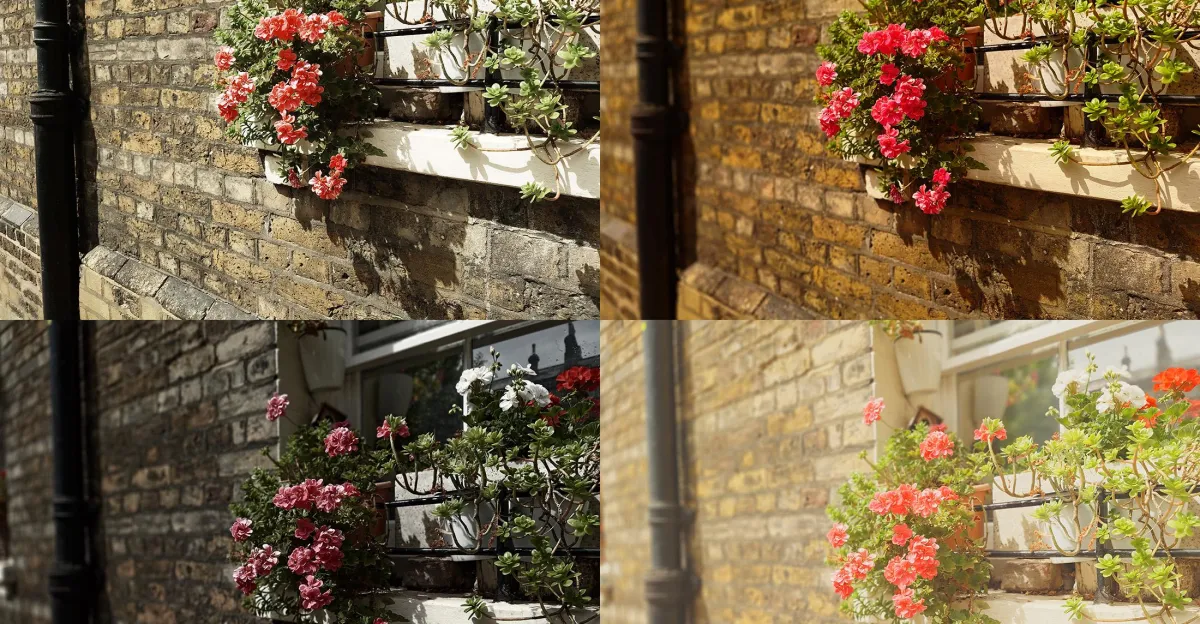
When Sony announced the Xperia 1 VIII last month, it promoted the phone by sharing some of the worst photos taken on a Sony camera in years. These weren’t just any photos, though: they were taken with Sony’s new AI Camera Assistant. After a week with the Xperia 1 VIII, I’m here to tell you that the AI assistant is exactly as bad as Sony made it look.
After Sony first showed me the AI Camera Assistant during a press briefing for the Xperia 1 VIII, I said it looked “like an improved version of Google’s Camera Coach.” It’s pretty clear I got that wrong. Camera Coach, found on the latest Pixel phones, is a dedicated camera mode that talks you through framing a shot, asking what you want to focus on and giving specific tips on framing, positioning, which camera lens to use, and whether to use Portrait mode or not. I found it underwhelming when I reviewed the Pixel 10A, but it does clearly serve as a basic photography coach.
Sony’s AI Camera Assistant is different. It’s embedded directly into the camera app’s default mode, and pops up automatically while you’re trying to take a photo — though Sony does allow you to turn it off entirely. While you’re trying to take a photo a small box pops up in the viewfinder showing what the photo would look like with alternate settings suggested by Sony’s AI. A quick tap enables those settings, or you can swipe down to flick through another three alternate options.

The suggestions pop up before you actually take the shot — this isn’t for editing photos you’ve already taken. Unlike Google’s Camera Coach, the Assistant doesn’t offer any advice on framing or focus, it just applies a filter and leaves the rest to you. It doesn’t even tell you what effects it’s applying, so you won’t learn anything about why the image looks that way or how to achieve the effect yourself.
The suggestions don’t appear consistently. They’re not supported at all on the selfie camera, though I’ve no idea why. Pointing the camera directly at a bright light or a backlit window usually doesn’t bring up any AI suggestions, nor does looking at a blank wall. It doesn’t tend to offer options for macro shots, but occasionally it does. If I try to take a photo of the palm of my hand the AI Assistant has plenty of ideas; if I turn my hand sideways or backwards, those options disappear. If there’s a logic being followed here, I couldn’t tell you what it is.
1/5
The overwhelming majority of the changes the AI Assistant suggests are adjustments to exposure, white balance, contrast, and other basic image settings — and usually aggressive adjustments, at that. Sometimes it will suggest darkening a photo until it’s murky and moody, other times it will crank up the highlights until they’re blown beyond recognition. It loves to suggest a sepia effect, or move the white balance towards yellow to create a warmer final photo. There’s usually at least one option with the saturation pushed up to make everything pop.
Beyond color and exposure adjustments, the AI Assistant will sometimes enable an artificial bokeh effect too, blurring the background as in portrait mode. In its smarter moments, it might brighten the subject of an image, while darkening the background, to help them stand out. Sony claims it can suggest swapping between the phone’s three rear lenses or even help you find “the most photogenic angle,” though after a week of testing I’ve yet to see this happen once.
1/5
You know where else we’ve seen effects like this? Instagram. It’s had photo filters for 16 years, only its filters have gotten subtler than these. What’s especially strange is that, like most phones, the Xperia has filters too — a range of five, including a film simulation and a more vivid mode. The key difference is that rather than suggesting preset visuals, the AI Camera Assistant is ostensibly reacting to the scene, subject, and lighting to dynamically suggest the best alterations for that specific moment — that’s the AI of it all. In theory that’s not the worst idea, in practice the actual results render it unusable.
The Assistant has only generated a handful of photos I’d ordinarily deem worth keeping, fewer than that worth sharing on social media, and just one or two that have a credible claim to being better than the original. I’ve found it tends to be more useful the worse the lighting is, simply because the default camera settings are more likely to struggle. But even here, you’ll be lucky to have one or two photos worth taking.
1/5
This isn’t the camera’s fault. While I wouldn’t say that the Xperia 1 VIII has the best camera in a smartphone right now, it certainly has a good one. With large sensors across all three rear lenses it has hardware that outclasses Apple and Google’s, and a distinctive processing style, with just slightly amped up contrast, of which I’m mostly a fan. This is Sony’s best Xperia camera yet, and competitive with other phones at its elevated price point — the equivalent of $1,850, though the phone isn’t actually launching in the US. It’s that quality elsewhere that makes the AI assistant all the more bemusing.
Sony’s decision to make its suggestions before you take the photo, rather than after, has seemingly had some unwelcome knock-on effects to performance. Despite using the flagship Snapdragon 8 Elite Gen 5, the Xperia 1 VIII runs unevenly at the best of times, and has a propensity to overheat. Running the AI Camera Assistant seems to add to the strain. The camera app often opens slowly, and can freeze or hang for several seconds at a time when switching lenses, accessing the AI suggestions, or taking a photo. The whole camera crashed once while I was writing this article. Turning the camera assistant off seems to have alleviated those issues.
1/5
Perhaps we should be thankful. Sony’s attempt at injecting AI into its camera doesn’t involve editing objects out of photos, expanding images to include details that weren’t there, or reframing real shots entirely — all included in Apple’s new iOS 27 update. Unlike those AI options, and countless others from Google and Samsung, Sony’s AI Camera Assistant doesn’t raise any uncomfortable questions about what a photo is. It just makes me wonder if anyone in Sony’s Xperia team knows what makes a photo good.
Photography by Dominic Preston / The Verge









Leave a Reply