

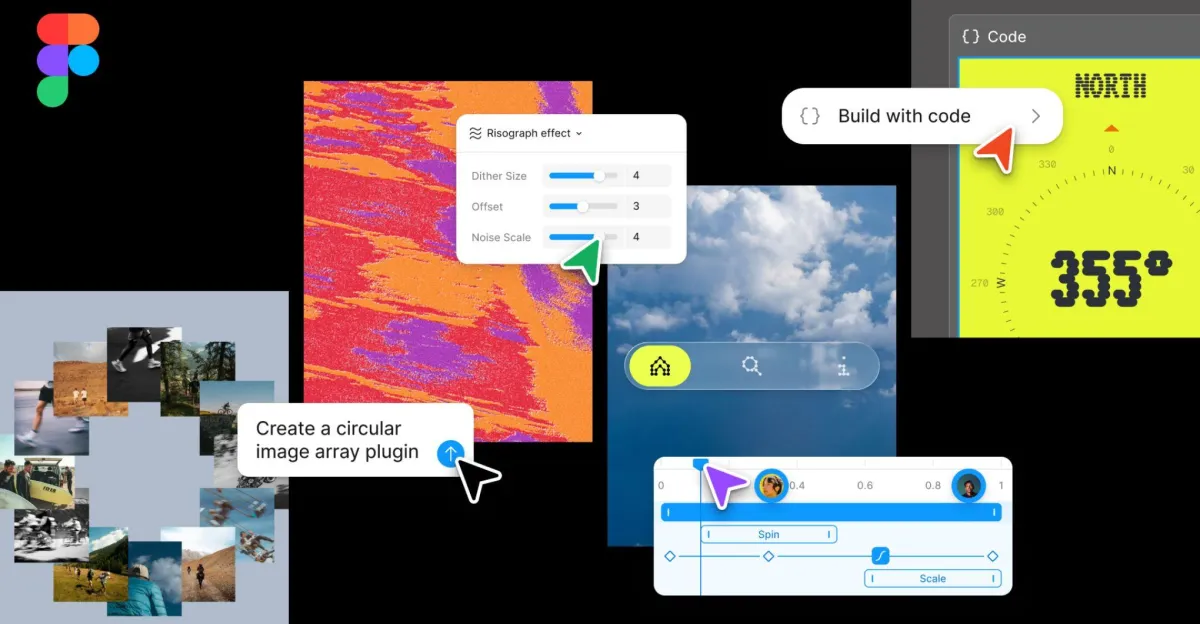
Figma just handed designers the ability to write code directly inside their designs. The collaborative design platform rolled out a major update that introduces code layers, native support for animations and shaders, and an AI-powered system for building custom plugins on the fly. It’s the kind of move that blurs the line between design and development – and puts pressure on Adobe’s Creative Cloud to keep pace.
Figma is making its biggest play yet to own the entire design-to-development pipeline. The company’s latest update introduces code layers – a feature that lets designers drop JavaScript, TypeScript, or other code directly into their design files alongside traditional vector shapes and text elements.
It’s a fundamental shift in how design tools work. Until now, designers created static mockups in Figma, then handed them off to developers who rebuilt everything in code. Code layers collapse that handoff. A designer can now prototype an interactive button with real logic, test it with users, and pass that exact code to engineering. No translation required.
The timing matters. As AI tools blur professional boundaries across tech, Figma is betting that designers want more control over implementation details. The code layer feature supports popular frameworks and libraries, letting teams prototype with the same tools they’ll use in production.
But the code layers are just the opening act. Figma’s animation and shader support brings motion design capabilities that previously required separate tools like After Effects or Principle. Designers can now build complex transitions, micro-interactions, and even custom shader effects without leaving the canvas. That’s a direct shot at Adobe’s workflow lock-in – one of the few advantages Creative Cloud still held over Figma’s web-first approach.
The most intriguing addition might be the AI-powered plugin builder. Rather than learning Figma’s plugin API and writing traditional code, users can now describe what they want in natural language and watch the AI generate a working plugin. Need to batch-rename 500 layers based on a specific pattern? Ask the AI. Want to automatically generate design system documentation? Describe the format and let the AI build it.
It’s the kind of feature that sounds simple until you consider the implications. Figma has spent years building a plugin ecosystem with thousands of third-party tools. Now they’re democratizing plugin creation, letting anyone spin up custom automation for one-off tasks. That could flood the platform with hyper-specific tools, or it could fragment the ecosystem as teams build internal solutions instead of relying on shared plugins.
The update also signals where Figma sees its competitive threats. This isn’t about beating Sketch or Adobe XD anymore – those battles are over. This is about defending against code-first design tools like Framer and Webflow that let designers build production-ready interfaces without traditional development. By bringing code directly into Figma, the company is trying to be both the designer’s tool and the developer’s playground.
For enterprise teams, the implications are significant. Design systems can now include actual component logic, not just visual specs. Prototypes can use real API data instead of placeholders. QA teams can test interactions before a single line of production code is written. That’s the kind of workflow compression that justifies Figma’s enterprise pricing.
The AI plugin builder also raises questions about Figma’s relationship with its developer community. Third-party plugin makers have built businesses on solving workflow problems for Figma users. If AI can generate those solutions on demand, what happens to the plugin marketplace? Figma will need to walk a careful line between empowering users and undercutting the ecosystem that made the platform sticky in the first place.
The update comes as Figma continues operating independently after its $20 billion acquisition by Adobe fell apart under regulatory scrutiny. Without Adobe’s resources, Figma has doubled down on its core advantage – collaborative, web-native design that works across teams and platforms. Adding code layers and AI automation keeps that momentum going.
Competitors will respond. Adobe is pushing its own AI features across Creative Cloud. Framer already positions itself as a code-forward design tool. Canva is expanding from consumer graphics into professional design workflows. But Figma’s installed base in tech companies gives it a distribution advantage. When millions of designers already live in your tool daily, adding new capabilities is easier than convincing them to switch platforms.
Figma’s latest update isn’t just about adding features – it’s about redefining what a design tool can be. By bringing code, animation, and AI-powered automation into the same canvas where teams already collaborate, Figma is trying to own more of the product development workflow. The risk is complexity creep, turning a beloved design tool into an overwhelming Swiss Army knife. The opportunity is collapsing handoffs that slow down every product team. Watch how enterprise design systems adopt these features – that’ll show whether Figma’s vision of code-savvy designers matches reality or runs ahead of what most teams actually need.









Leave a Reply